Showing posts with label apps. Show all posts

Friday, November 21, 2014

Apple to push Beats Music to all iPhones and iPads


According to a report by the Financial times, Apple is planning make the Beats Music app a part of its iOS software, pushing the app to all "hundreds and millions iPhones and iPads" in early 2015.

The innovative music streaming app brings ad-free access to over 20 million songs, which one can listen on demand or download to play offline.

This news may have been expected after Apple purchased Beats Electronics, the parent company of Beats Music, for $3 billion earlier in May this year. The company better known for its headphones, released the Beats Music app in January, in the US to compete with Spotify, Rhapsody and other music streaming services.

The Financial Times claim that Beats Music will be integrated within the iOS software as early as March 2015, to sway Apple iTunes's users to try the streaming service and charge for monthly subscriptions using the Apply Pay payments technology.

Thus far Beats Music has only been available to US subscribers, however Financial Time's suggest that the service will be launching globally and rebranded under the iTunes label.

Spotify's recent growth of more than 50 million active users with 12.5 million subscribers paying, has sparked speculation that Apple plans to compete in the music streaming industry in 2015 and beyond.

Sale of music downloads in the iTunes store has been on the decline in 2014, as admitted by Apple in October, following a report by Wall Street Journal that sales had dropped year-on-year globally at between 13% and 14%.

Recently, Taylor Swift pulled her entire music catalogue from Spotify as she claimed that the amount received from royalties undervalued her work. This is causing artists to reconfigure the value of streaming services.


Tech news site Recode claimed: “Among the things Apple wants is a new pricing structure that would allow it to sell the service for less than the $10 level it’s at now". Apple is rumoured to be making licensing deals with labels to enter the market with competitive prices. 

Thursday, September 4, 2014

App of the Week: Screen Dimmer


Download Link

Platform: Android
Price: Free
Function: Reduces screen brightness below built-in brightness settings for dark environments.

I and 80% of people who own mobiles, fiddle around with my phone under the covers just before going to sleep. Setting your screen brightness at its lowest still feels like you're staring at the sun and after a while your eyes feel strained and your head starts to buzz. This app applies a filter on your phone and also has a timed option.

Top features:
  • Variable opacity
  • Scheduling.
  • Disable the button's backlight.
  • Automatically toggle the app with the sunset/rise to use Screen Dimmer at night. [Pro]
  • Choose the apps to launch when Screen Dimmer starts. [Pro]


Any recommendations for "App of the week" or do you disagree with this weeks choice? Leave a comment and share your opinion. You can share this post using the buttons below or in the right sidebar. Follow by email to stay updated and thank you for reading!

Thursday, June 26, 2014

5 Free iOS Apps for Instagram Lovers!


1. PixlrExpress+

Download
This app is jam packed with a ton of features and options. It amazes me how it remains free without ads or in-app purchases. None of the free collage makers in the App Store can match up to the customizations in this app. There are plenty of collage frames and you can tweak its thickness, colour and roundness with a slider. It also includes:

  • 17 Adjustments
  • Borders
  • 87 Filters 
  • 343 Overlays
  • Text with a range of fonts & colours
  • Stickers
Pixlr Express Screenshot


2. Squaready

Download
Instagram can be quite annoying when it comes to its square cookie-cutter. Photos which you don't want to crop can be resized to fit into a square using Squaready. You can change the background colour to add an extra something to the photo.
Squaready on iPhone

3. PicPlayPost

Download
Make video collages using this app. It can be a bit confusing to use at first, but once you get the hang of it you'll love how it keeps your posts unique and different. You can make a video collage, a picture collage or a combination of the two. The last one is quite popular.

My attempt at a video-photo collage

4. Flipagram

Download
Ever caught in a dilemma where you've got lots of good photos and you simply can't choose "a few" good ones? Flipagram basically makes a slideshow of your photos in the form of an Instagram video and background music from your library. Unless you can pay $1.99, a watermark in the form of the Flipagram logo appears in your videos. An alternative is the Everlapse app.


Popagraph on iPhone

5. Popagraph

Download
This app is pretty unique in what it does, which is to make your subject "pop". You can apply filters to the background or to the subject itself, add frames to contain the background and even add text. It's pretty easy to use and fun experimenting with.


Leave a comment and share your opinion. You can share this post using the buttons below or in the right sidebar. Follow by email to stay updated and thank you for reading!

Monday, December 23, 2013

15 iPhone and iPad Apps Students will love to use in Class


As a student I have loved using my smartphone and tablet both in and outside the classroom, especially when studying last minute right outside the examination hall. It's just so handy having all your needs in one place and saving so much time and energy, to do other important stuff like catching up on GOT. These apps will help you in so many ways and make life simpler for you, but one thing they can't do is study for you. Tough luck, you're on your own there.

1. Evernote:

Download free


How can a list like this start without mentioning Evernote. I'm sure most of you have heard and used this app by now; if not, (a) stop reading (b) download it here now and then (c) come back and see what other cool apps I'm about to show you.
Evernote has taken the simplicity of jotting down a note onto a whole different level. It has great options to help organize your notes into notebooks, by adding labels and sorting them by dates and location. You can take a photo of your scribbled notes and it'll transcribe it into text for you.
It has great formatting tools to give your notes a more polished feel, and that's why you can type entire letters and assignments on to this app complete with bullet points and a bold red headline.
Evernote Notebooks iPhone App

All of these features are great, but what makes this app fantastic is that you can access it everywhere; via apps on your smartphone, tablet, laptop and online from your friend's computer. I've often used this to take notes (or discreetly write articles for my blog) in the classroom and sync unfinished papers between devices.

2. i-Clickr PowerPoint Remote:

Download Free or Paid($9.99)

I love this app. As a business student, I was required to deliver 2-3 presentations a semester. I would make and practice it to perfection, but my biggest hassle wasn't the speaking part, rather it was coordinating the slide's timings with the person sitting next to the laptop. This app is such a blessing, as it allows you to control your presentation from afar through your phone or tablet and has plenty of additional features. It can record your presentations (slides and your voice audio) into a movie, let's you share a PDF version via e-mail, view slides and slide notes during presentation, and also possesses an on board clock, real-time annotations and an alarm system.
In order for it to work, a program is required to be installed on the computer displaying projecting your presentation. The setup is small hassle, but its worth it at the end of the day. The lite version works for only 15 slides.
i-Clickr Powerpoint Remote


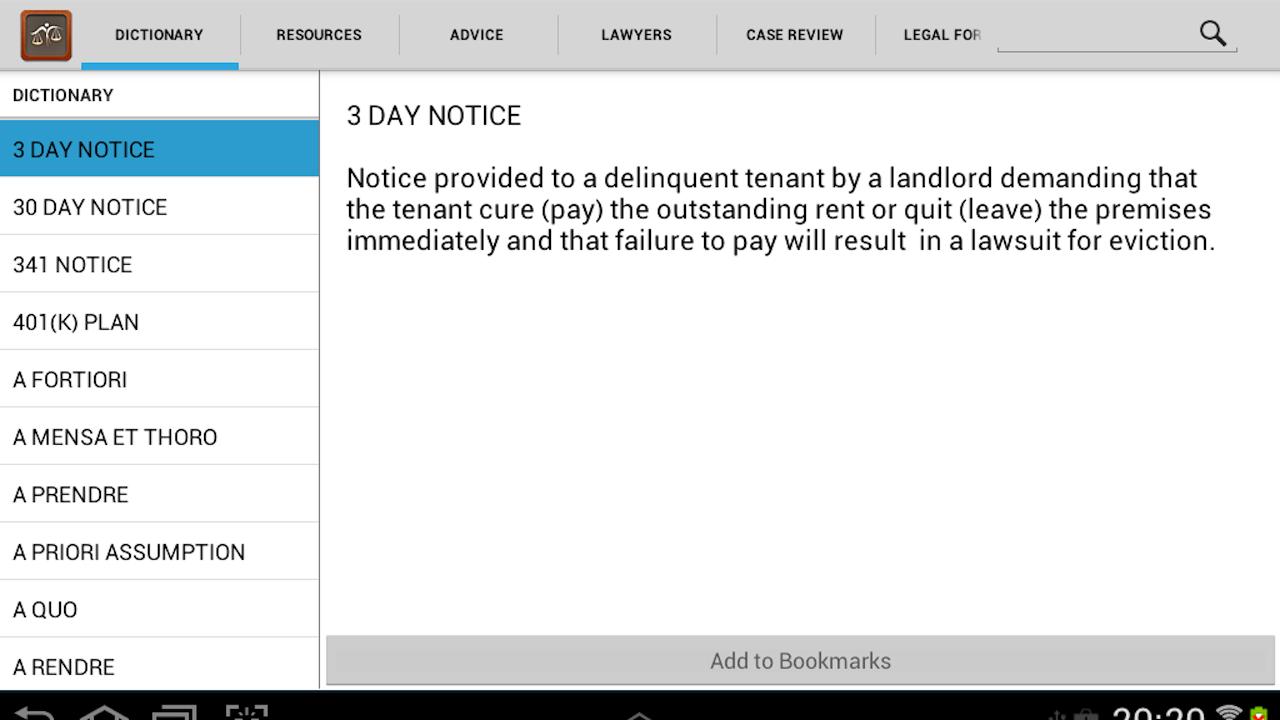
3. Subject- Specific Dictionaries:


QFINANCE Dictionary of Business and Finance ($3.99)
The Law Guide
Medwords Medical Dictionary ($0.99)
German English dictionary

I think this goes into the list without saying why its important. When you're studying a certain field of education then subject-specific dictionaries are the best. In class my friends would score brownie points with our teachers by checking the definitions of business terms asked, under their desks. When choosing between subject dictionaries in the Appstore, look for those with offline access. The best ones in Business, Law, Medicine, and German are mentioned above. My favourite English dictionary which includes synonyms and offline access is Merriam-Webster. 

The Law Guide iPhone App


4. Pocket:


Pocket is perfect for saving webpages. It captures articles, videos or websites you want to check out later, in a smart and easy-to-use layout. This is especially helpful for students when gathering online content for class research, which you want to use or read later. You can save class readings onto your device to read later at the bus stop. The best part is that it is deliciously fast and allows for offline viewing. The second best part is that it syncs across your phone, tablet, and computer so you can view it anytime on any device, without an Internet connection. 


5. Cloud Storage:

Dropbox
Google Drive
Skydrive

Cloud storage is the floppy disk of today, only its invisible. From the many services to choose from, the most popular is Dropbox followed by Google Drive and Microsoft's Skydrive (if you don't know what all this means, stay tuned for an explanatory post coming up on cloud storage by subscribing via email on the right).
I'm sure you use it already to backup files and photos, but its golden purpose in college lies in the one click transferring of files between your computer and smartphone. Assignments, class readings, presentations, notes... you name it; just drag and drop the file into the dropbox/drive folder on your computer, and you can pick up from where you started on your phone and work offline.


6. Smart Writing Tools - 7notes

Download Free or Paid ($7.99)

This handwriting app can be very useful when taking notes in the classroom on your iPad. Typing may be simpler, but we all know how auto-correct turns technical terms into a mumbo jumbo of text. 7notes is the app of the future which converts your iPad or iPhone into digital paper. You can write notes by hand, and it can convert your handwriting into digital text accurately (premium version only), which you can then save as editable notes or email it to a friend or yourself. 
It lets you vary the colour and thickness of the pen, and easily switch between the keyboard and pen. It is easier to use on either an iPad or if you have a stylus pen. You can also send an old-fashioned handwritten note to a friend via SMS, Facebook or Twitter, as well as store to online services like Dropbox and Evernote.


Smart Writing Tools 7note iPhone App


7. OCR Application:

Download Prizmo ($9.99)
LEADTOOLS OCR Application (Free)

OCR applications are used to convert printed text from a book, magazine or article into digitized text. They are very useful in transcribing passages out of books or that useful article from the magazine you just found at the dentists. Of the many to choose from, Prizmo has the best results and sharing options. But it is pretty pricey and so you can download the free LEADTOOLS app which does a good and quick job with the occasional hiccup. It has a good set of options and is very easy to use, requiring no internet connection to work.


LEADTOOLS OCR Application for 


8. Dragon Dictation:

Download here

Here's a useful dictation app for those with slow typing speed (or the ultra lazy).  Dragon Dictation is great for typing up long passages of text. I often use dictation applications when having to write pages of "my own words" out of books or webpages and this is my go-to app for the iPhone. This app requires a working internet connection to work; it would've been better if it could work offline, if you're on a data plan or not in Wi-Fi range you can always use the Window's own built-in narrator application on your laptop. iPhone users who possess their own virtual assistant in the form of Siri can order her to type up short memos for you.


9. Quickoffice


This free app from Google lets you create and edit Microsoft® Office documents, spreadsheets and presentations on your Android phone and tablet. Your files automatically backup in Google Drive allowing you access from any device. It can also be used to open and view PDF files.


10. Calculator:

The stock calculator app in the iPhone and iPad has all the basic and most of the advanced computations needed in class. For those who don't know, if you hold your phone horizontally in landscape mode your basic calculator turns it a scientific one. You can also access more functions by pressing the 2nd button located left most on the second row. 


iPhone Stock Calculator


11. Textbooks!

Apple's iBooks
Amazon Kindle

Amazon and other services are continuously adding textbooks to their libraries, but even so not all your textbooks are available online. Now and then, I would find a book online and loved having them on my tablet and, for the others I owned in paperback I would scan certain chapters using the handy app (item #12) below and add them to my library within the Kindle app or iBooks. Furthermore, you can highlight text and add notes at any point in the book. Most of all you'll enjoy the search feature; it is ten times more useful than an index. You can also find cheap or free textbooks on apps like eTextbooks for the iPad and Boundless Textbooks. 


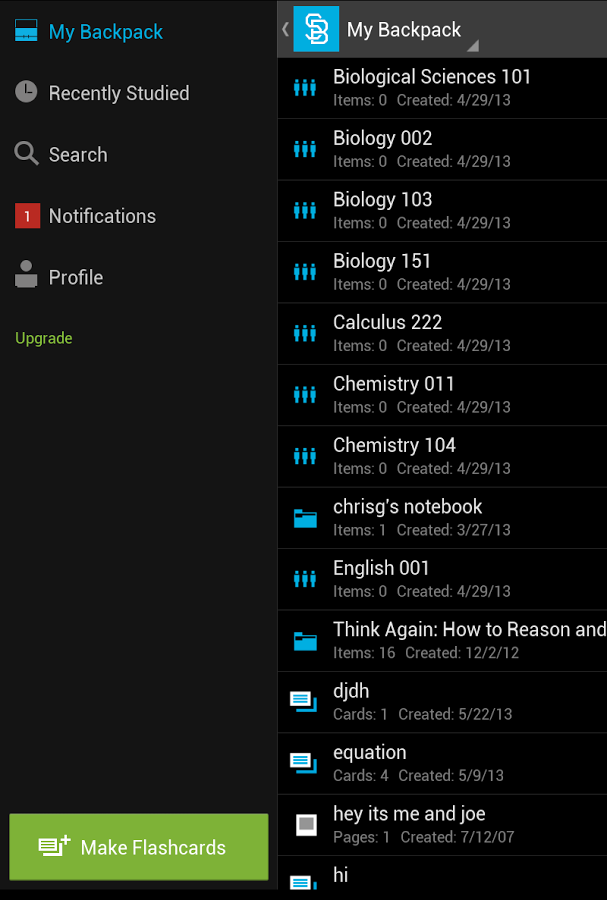
12. Studyblue Flashcards

As the name suggests, STUDYBLUE is an app which lets you create flashcards with text, pictures or audio. The online search feature gives you access to millions of other flashcards available online. Furthermore it offers quizzing, tracking for study session progress, messages to your classmates and more. 


13. Wolfram|Alpha

Download here ($2.99)

An app to answer all your mathematical and factual questions in math, art, computer programming, economics, physics, chemistry, biology, medicine, finance, history, and much much more. This beats Google by giving you a straight-up answers to complex mathematical formulae and in-depth reports on almost every topic imaginable.


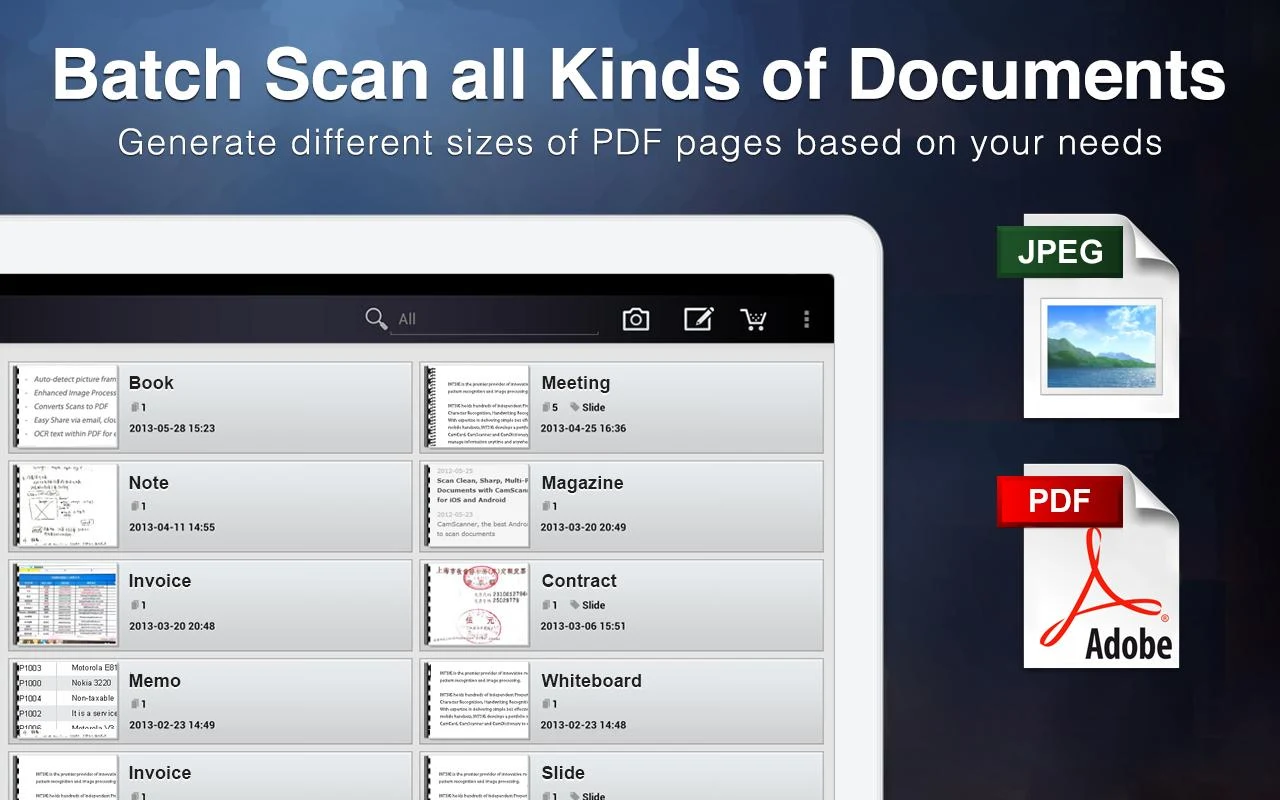
14. CamScanner - Phone PDF Creator

Download Free or Paid ($4.99)


CamScanner is an intelligent document management solution, which basically turns your smartphone into a scanner. So no need to buy that fancy new HP scanner you were eyeing if you've got a good camera-phone. It is the perfect fit for those who want to scan, sync, edit, share and manage various contents on all devices and lets you quickly scan documents with optimum quality. The bonus features of the paid (ad-free) version are extracting text from documents, 10GB of cloud storage, higher quality scans and no watermarks.


15. Khan Academy:


The official app of Khan Academy features video lectures from the popular website, which can be viewed and downloaded onto your phone for offline viewing later. For those unfamiliar with Khan Academy, you'll find this website and app pretty useful in understanding topics which books and teachers aren't able to help you with. For free you can learn about math, art, computer programming, economics, physics, chemistry, biology, medicine, finance, history, and more. It's good for those moments when you hit a roadblock when studying, and in revising concepts. 

Khan Academy Video Playing iPhone App

Bonus: 16. My Grades and Homework

Download here ($0.99)

A great app to keep track of all your grades and assignments, as well as calculate your current grade or GPA for you. It comes packed with lots of customizable features and allows you to backup your data to Dropbox for added protection.


Also view our list of 15 Favourite Android Apps Students will love to use in Class.
Kindly leave a comment and share this post using the buttons below or in the right sidebar. Follow by email to stay updated and thank you for reading!


Wednesday, December 18, 2013

15 Android Apps Students Will Love to Use in Class


As a student I have loved using my smartphone and tablet both in and outside the classroom, especially when studying last minute right outside the examination hall. It's just so handy having all your needs in one place and saving so much time and energy, to do other important stuff like catching up on GOT. These apps will help you in so many ways and make life simpler for you, but one thing they can't do is study for you. Tough luck, you're on your own there.

1. Evernote:

Download here

How can a list like this start without mentioning Evernote. I'm sure most of you have heard and used this app by now; if not, (a) stop reading (b) download it here now and then (c) come back and see what other cool apps I'm about to show you.
Evernote has taken the simplicity of jotting down a note onto a whole different level. It has great options to help organize your notes into notebooks, by adding labels and sorting them by dates and location. You can take a photo of your scribbled notes and it'll transcribe it into text for you.
It has great formatting tools to give your notes a more polished feel, and that's why you can type entire letters and assignments on to this app complete with bullet points and a bold red headline.
All of these features are great, but what makes this app fantastic is that you can access it everywhere; via apps on your smartphone, tablet and computer and online (from its website) through your friend's computer. I've often used this to take notes (or discreetly write articles for my blog) in the classroom and sync unfinished papers between devices.


Further more, as a privileged android user take advantage of placing widgets on your home screen to make the app more accessible and easier to use. You have to download a separate app, Evernote Widget, to get the whole range of widgets (makes no sense to me either) but its worth the extra space.


2. Presentation Remote:


I love this app. As a business student, I was required to deliver 2-3 presentations a semester. I would make and practice it to perfection, but my biggest hassle wasn't the speaking part, rather it was coordinating the slide's timings with the person sitting next to the laptop. This app is such a blessing, as it allows you to control your presentation from afar through your phone or tablet. It connects both devices via Bluetooth or Wi-Fi and works seamlessly allowing you the freedom to stray away from your laptop, switching slides from the palm of your hand. It also has a built-in timer.

3. Subject- Specific Dictionaries:


I think this goes into the list without saying why its important. My favourite English dictionary which includes synonyms and offline access is Merriam-Webster. But when you're studying a certain field of education then subject-specific dictionaries are the best. In class my friends would score brownie points with our teachers by checking the definitions of business terms asked, under their desks. When choosing between subject dictionaries in the Play store, look for those with offline access. The best ones in Law, Medicine, and German are mentioned above.
Image taken from app description in Play Store 


4. Pocket:


Pocket is perfect for saving webpages. It captures articles, videos or websites you want to check out later, in a smart and easy-to-use layout. This is especially helpful for students when gathering online content for class research, which you want to use or read later. You can save class readings onto your device to read later at the bus stop. The best part is that it is deliciously fast and allows for offline viewing. The second best part is that it syncs across your phone, tablet, and computer so you can view it anytime on any device, without an Internet connection.


5. Cloud Storage:


Cloud storage is the floppy disk of today, only its invisible. From the many services to choose from, the most popular is Dropbox followed by Google Drive and Microsoft's Skydrive (if you don't know what all this means, stay tuned for an explanatory post coming up on cloud storage by subscribing via email on the left).
I'm sure you use it already to backup files and photos, but its golden purpose in college lies in the one click transferring of files between your computer and smartphone. Assignments, class readings, presentations, notes... you name it; just drag and drop the file into the dropbox/drive folder on your computer, and you can pick up from where you started on your phone and work offline.

6. Mobile OCR:

Download: Free or Paid ($4.12)

A handy app to convert all your handwritten notes into regular computerized text - image to text. For those more comfortable jotting down notes by hand in class or the slow typers, this app will help bring you the dark side. Typed notes can be immensely useful; you can make notebooks in Evernote and organize your notes by tags. Searching a particular word from all your notebooks takes less than a second. Most of all, it saves space and is great for travelling. All of your notes available on your phone, tablet or laptop, backed up and always available.
Image taken from Lifehacker

7. ListNote Speech/Text Notepad:

Download Free or Paid ($4.99)

Here's a useful dictation app for those with slow typing speed (or the ultra lazy).  Listnote is great for typing up long passages of text for you and then let's you further organize those notes or ideas by category and colours. I often dictation applications when having to write pages of "my own words" out of books or webpages, but I usually fluctuate between the Android keyboard's own built in voice command and Listnote. If you can afford to shell out $200 go for the Dragon Naturallyspeaking app on PC and its companion app on Android.

8. QuickOffice:

This free app from Google lets you create and edit Microsoft® Office documents, spreadsheets and presentations on your Android phone and tablet. Your files automatically backup in Google Drive allowing you access from any device. It can also be used to open and view PDF files.


9. RealCalc Scientific Calculator

Download Free or Paid ($3.25)

Math is everywhere when studying, you'll need this.

10. Studious


I wish I had found this app sooner. I have been the joke of the class with many thanks to my phone singing pop songs during lectures. For the forgetful student whose Mum loves to ring during school hours, this app will save you the dirty looks from your teacher by automatically turning your ringer to silent for class, according to your timetable. You can also add notes and set homework and test reminders.


11. Books!

Play Textbooks
Amazon Kindle
Amazon and Google Play are continuously adding textbooks to their libraries, but even so not all your textbooks are available online. Now and then, I would find a book online and loved having them on my tablet and, for the others I owned in paperback I would scan certain chapters using the handy app (item #12) below and add them to my library within the Kindle or Aldiko app. Furthermore, you can highlight text and add notes at any point in the book. Most of all you'll enjoy the search feature, it is ten times more useful than the index.

12. Studyblue Flashcards

As the name suggests, STUDYBLUE is an app which lets you create flashcards with text, pictures or audio. The online search feature gives you access to millions of other flashcards available online. Furthermore it offers quizzing, tracking for study session progress, messages to your classmates and more. 
Image taken from app description on Google Play

13. Wolfram|Alpha

Download here ($2.99)

An app to answer all your mathematical and factual questions in math, art, computer programming, economics, physics, chemistry, biology, medicine, finance, history, and much much more. This beats Google by giving you a straight-up answers to complex mathematical formulae and in-depth reports on almost every topic imaginable.

14. CamScanner - Phone PDF Creator

Download Free or Paid ($4.99)

CamScanner is an intelligent document management solution, which basically turns your smartphone into a scanner. So no need to buy that fancy new HP scanner you were eyeing if you've got a good camera-phone. It is the perfect fit for those who want to scan, sync, edit, share and manage various contents on all devices and lets you quickly scan documents with optimum quality. The bonus features of the paid (ad-free) version are extracting text from documents, 10GB of cloud storage, higher quality scans and no watermarks.
Image taken from app description on Google Play

15. Khan Academy:

Download Free or Paid ($1.99)

The unofficial app of Khan Academy features video lectures from the popular website, which can be downloaded onto your phone and saved for offline viewing later. For those unfamiliar with Khan Academy, you'll find this website and app pretty useful in understanding topics which books and teachers aren't able to help you with. For free you can learn about math, art, computer programming, economics, physics, chemistry, biology, medicine, finance, history, and more. It's good for those moments when you hit a roadblock when studying, and in revising concepts. This app just about does the job on your phone, but it still needs much work to be done on it. In some ways you may be better off accessing the website from your desktop, but its worth a try.


If you enjoyed this list, please subscribe via email using the box in right sidebar and leave a comment below. Don't forget to check back in for more tips, tricks, reviews and lists!


Thursday, December 12, 2013

Instagram Direct: Send private photos and videos to followers

Today, Instagram released an exciting new update to Android and  iOS launching an unanticipated new feature: Instagram direct. Instagram for iOS version 5.0 is available at the App Store, and Instagram for Android version 5.0 is available in Google Play.

Instagram direct lets you send photos and videos in a private message to a friend or to a group of people. What makes this different from your standard photo messaging apps is the included Instagram filters, which you can apply on your photos and videos. You can also comment and like (<3) the photo/video within the message. This leaves room for fun group chats on a photo depicting an inside joke.

Direct messaging has notably been absent from Instagram, which has been frustrating for people with large followers to communicate with their fans, causing them to resort to using third party apps like Kik Messsenger and BBM. Instagram direct is surely like rain to those stranded in the Sahara desert; now enabling those who've amassed large armies of followers to personally correspond with their favourites and plan their next attack.


Instagram has also changed the app design, although keeping the layout and filters unchanged. The design has a new camera icon and has subtly moved from its traditional blue tp inducing more black into the app.