Friday, November 21, 2014

Apple to push Beats Music to all iPhones and iPads


According to a report by the Financial times, Apple is planning make the Beats Music app a part of its iOS software, pushing the app to all "hundreds and millions iPhones and iPads" in early 2015.

The innovative music streaming app brings ad-free access to over 20 million songs, which one can listen on demand or download to play offline.

This news may have been expected after Apple purchased Beats Electronics, the parent company of Beats Music, for $3 billion earlier in May this year. The company better known for its headphones, released the Beats Music app in January, in the US to compete with Spotify, Rhapsody and other music streaming services.

The Financial Times claim that Beats Music will be integrated within the iOS software as early as March 2015, to sway Apple iTunes's users to try the streaming service and charge for monthly subscriptions using the Apply Pay payments technology.

Thus far Beats Music has only been available to US subscribers, however Financial Time's suggest that the service will be launching globally and rebranded under the iTunes label.

Spotify's recent growth of more than 50 million active users with 12.5 million subscribers paying, has sparked speculation that Apple plans to compete in the music streaming industry in 2015 and beyond.

Sale of music downloads in the iTunes store has been on the decline in 2014, as admitted by Apple in October, following a report by Wall Street Journal that sales had dropped year-on-year globally at between 13% and 14%.

Recently, Taylor Swift pulled her entire music catalogue from Spotify as she claimed that the amount received from royalties undervalued her work. This is causing artists to reconfigure the value of streaming services.


Tech news site Recode claimed: “Among the things Apple wants is a new pricing structure that would allow it to sell the service for less than the $10 level it’s at now". Apple is rumoured to be making licensing deals with labels to enter the market with competitive prices. 

Thursday, September 4, 2014

App of the Week: Screen Dimmer


Download Link

Platform: Android
Price: Free
Function: Reduces screen brightness below built-in brightness settings for dark environments.

I and 80% of people who own mobiles, fiddle around with my phone under the covers just before going to sleep. Setting your screen brightness at its lowest still feels like you're staring at the sun and after a while your eyes feel strained and your head starts to buzz. This app applies a filter on your phone and also has a timed option.

Top features:
  • Variable opacity
  • Scheduling.
  • Disable the button's backlight.
  • Automatically toggle the app with the sunset/rise to use Screen Dimmer at night. [Pro]
  • Choose the apps to launch when Screen Dimmer starts. [Pro]


Any recommendations for "App of the week" or do you disagree with this weeks choice? Leave a comment and share your opinion. You can share this post using the buttons below or in the right sidebar. Follow by email to stay updated and thank you for reading!

Friday, July 18, 2014

App of the Week: Sign


Download: Paid / Free

Platform: Android
Price: Free Lite / $1.99 Full
Function: Speed dialing & direct messaging by drawing "signs" on screen.

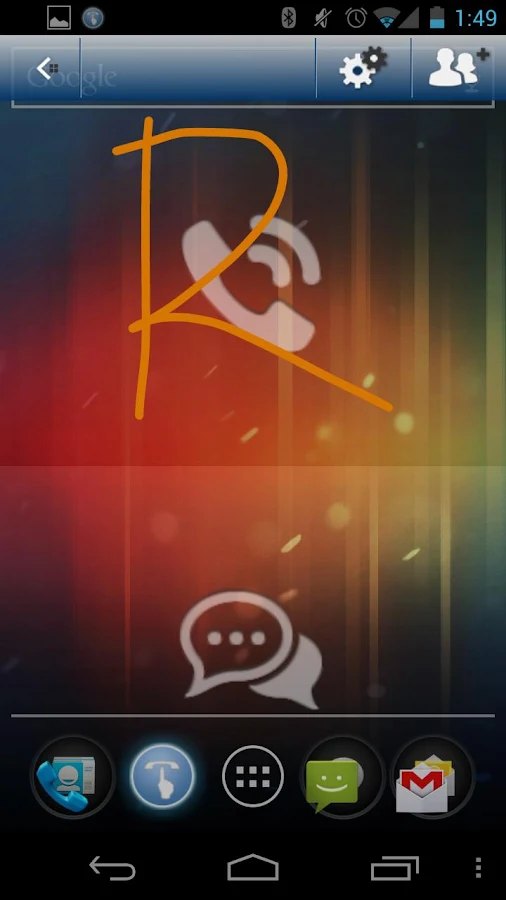
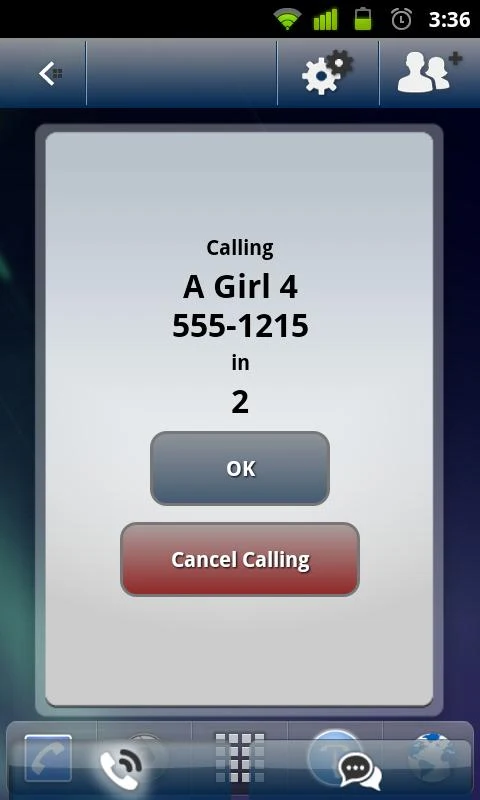
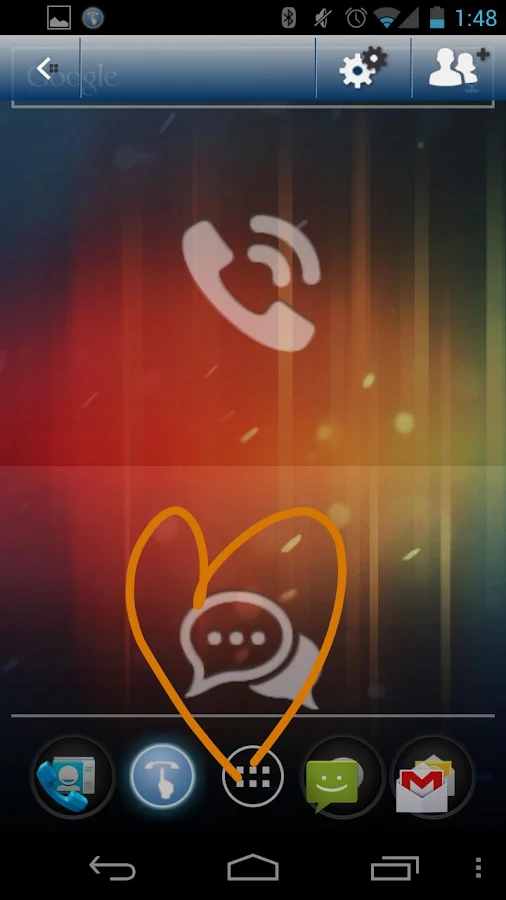
I came across this app a few years ago as a free app of the day on the Amazon Appstore. It was very unique and I really enjoyed it. Basically you can make a heart on your phone's screen and it will start ringing your mom. You can assign different "signs" for an unlimited number of people. The sign you choose is entirely upto you; it can be a number, a letter, a symbol or a just a scribble. There's no restrictions. Signs can also be assigned to text messages. The free version has the same functionality as the full version, except you have a limited number of signs.

Top features:
  • Use Sign even when other apps are open
  • Works with WhatsApp
  • Call without looking at the screen
  • Works with Voicemail passcode input
  • FAST - call/text any contact in seconds
  • Advanced misdial prevention features


Any recommendations for "App of the week" or do you disagree with this weeks choice? Leave a comment and share your opinion. You can share this post using the buttons below or in the right sidebar. Follow by email to stay updated and thank you for reading!

Tuesday, July 8, 2014

How to Open an Android Phone or Tablet with a Forgotten PIN Password


Recently my father absent-mindedly locked his Samsung Galaxy S5 with a PIN code and forgot the code. In other devices, a "forgot password" option shows up where you can unlock the device by entering your Gmail password, but the option wasn't available in this case. It was a tense few minutes having to imagine all his pictures, notes and saved files gone. (This is where one stresses the importance of backing up files!) Luckily, the Android Device Manager proved to be a star and unlocked the device in seconds. 

Note: This method only works for devices signed into your Gmail account and connected to the internet.

1. Log into the Android Device Manager at:

                        https://www.google.com/android/devicemanager    

2. Go to the Lock option.

3. Enter a new password, confirm it and then lock the device. The password will reset on your device instantaneously.


4. Enter the new password in your device and viola! your device will open up as it normally does.


Leave a comment and share your opinion. You can share this post using the buttons below or in the right sidebar. Follow by email to stay updated and thank you for reading!

Sunday, July 6, 2014

App of the Week: Photosynth


Download link

Function: Captures 360° panoramas
Platform: iOS
Price: Free

Microsoft took a 360-degree turn on panoramas by introducing Photosynth in 2008. This is one of those things which words can't describe you just have to see it (check out mine below!). Google replicated this feature in the form of Photosphere which it introduced in the Nexus 4. Photosynth also hosts a community where you can search, explore and see amazing 360° images of different locations in the world. You can share the image with friends and family but unless you upload it to the community publicly, the app will send a flat stitched image.

Top Features include:
  • Zoom, pan, and rotate your panorama in any direction with the immersive viewer.
  • Search and explore panoramas from the Photosynth community to discover new amazing interactive images.
  • Your panorama images can be saved to the camera roll.
  • Share photos to Facebook, Twitter or through email.

        
Any recommendations for "App of the week" or do you disagree with this weeks choice? Leave a comment and share your opinion. You can share this post using the buttons below or in the right sidebar. Follow by email to stay updated and thank you for reading!


Thursday, June 26, 2014

5 Free iOS Apps for Instagram Lovers!


1. PixlrExpress+

Download
This app is jam packed with a ton of features and options. It amazes me how it remains free without ads or in-app purchases. None of the free collage makers in the App Store can match up to the customizations in this app. There are plenty of collage frames and you can tweak its thickness, colour and roundness with a slider. It also includes:

  • 17 Adjustments
  • Borders
  • 87 Filters 
  • 343 Overlays
  • Text with a range of fonts & colours
  • Stickers
Pixlr Express Screenshot


2. Squaready

Download
Instagram can be quite annoying when it comes to its square cookie-cutter. Photos which you don't want to crop can be resized to fit into a square using Squaready. You can change the background colour to add an extra something to the photo.
Squaready on iPhone

3. PicPlayPost

Download
Make video collages using this app. It can be a bit confusing to use at first, but once you get the hang of it you'll love how it keeps your posts unique and different. You can make a video collage, a picture collage or a combination of the two. The last one is quite popular.

My attempt at a video-photo collage

4. Flipagram

Download
Ever caught in a dilemma where you've got lots of good photos and you simply can't choose "a few" good ones? Flipagram basically makes a slideshow of your photos in the form of an Instagram video and background music from your library. Unless you can pay $1.99, a watermark in the form of the Flipagram logo appears in your videos. An alternative is the Everlapse app.


Popagraph on iPhone

5. Popagraph

Download
This app is pretty unique in what it does, which is to make your subject "pop". You can apply filters to the background or to the subject itself, add frames to contain the background and even add text. It's pretty easy to use and fun experimenting with.


Leave a comment and share your opinion. You can share this post using the buttons below or in the right sidebar. Follow by email to stay updated and thank you for reading!

Wednesday, June 25, 2014

Nokia X Review


Nokia is hands down the best phone manufacturer in terms of hardware. Even Siri has admitted that the best phone is Nokia's Lumia! The windows operating system inherent in Nokia smartphones is excellent but what it lacks is the thousands of apps available on iOS and android. By combining android apps with an interface similar to Windows, Nokia X is the solution to what is keeping Nokia back from gaining a larger market share in smartphones.

SPECIFICATIONS:


HARDWARE:

Have you heard about that Brazilian policeman whose phone saved him from a bullet? Yeah, that was a Nokia. The company has a legacy for building durable and sturdy phones and the same applies here. The back case is made of a kind of tough plastic and you have a choice of six bright colours to choose from. The interchangeable case is great for keeping the phone looking fresh and new as it covers the entire phone and its buttons, excluding the screen. The case is so tightly attached, that we found it difficult to open and insert the SIM card.

On the right side, there are hard volume keys and a power/lock button. At the bottom of the front there is only one soft back key. The device is quick to charge, taking less than 2 hours to fully charge through the micro-USB port. A headset is included within the box which can be plugged into the 3.5 mm audio connector.


APPS:
Nokia Store on Nokia X
The Nokia X does allow the installation of android apps but you can not download via the goldmine of android apps, Google Play, without "rooting" your phone which in turn voids the warranty. People have complained about the lack of Google apps but you honestly don't feel the absence. The Nokia Store is pre-installed hosting a variety of apps but missing many notable ones including Whatsapp. To download these apps (without rooting) you can download third party app stores. 1Mobile Market is a good choice and has exactly the same interface as the Play store but it does not automatically update apps. I used a combination of 1Mobile and the Amazon Appstore.

PERFORMANCE:

Considering its low RAM, I was not expecting it to be amazingly fast but its performance exceeded expectations. It performs well and doesn't lag with heavy use. Games run well and the phone is quick in opening apps. Surprisingly, there is no task manager and neither is there a direct multi-tasking button. You can download task managers to track and kill open apps but it is disappointing to not see one by default. Instead there is a fastlane which serves the dual purpose of displaying notifications and recent apps, and can be quickly accessed by swiping to the left of the menu. Dual SIMs are supported which is quite handy in a country like Pakistan where SIM cards are cheap and you can get a broader network coverage and reap the best of packages from two networks simultaneously, although it can affect battery life.

Nokia X Fatslane
CAMERA:

Picture captured by Nokia X in direct sunlight
A 3.15 megapixel (with no flash) can be found at the back with a range of features, like
  • Auto and Manual White Balance settings
  • Active toolbar
  • Still Image Editor
  • Face recognition
  • Auto Exposure
  • Center weighted auto exposure
There is no front camera but you can still make video calls through Skype. 


KEYBOARD:

The default keyboard is wonderful and very nice to people with big thumbs. It has word recognition, next word prediction, swype and includes upto 30 languages including Arabic, Urdu, Hindi, Italian and more.

You can download other keyboards from an app store, but I did not find it necessary.


VERDICT:

For the cheap price of Rs.13,000 you can not get a better deal. It has an excellent body, processor, interface and audio quality. I would definitely recommend this to first-time smartphone users who do not have past experience and specific app requirements. If you can shell out an extra Rs. 4,600 then get the Nokia XL which features a 5 MP camera and a larger screen. Or wait for the release of the Nokia X2 which seems to be an upgrade on the Nokia X. However, current users are upset about Whatsapp not functioning properly and considering that it is a staple for all those living in South Asia, Nokia must resolve this issue quickly.


Note: At the time of writing Whatsapp is no longer running smoothly on the Nokia X; the app asks for an update (which is not available) and will not open. You can receive messages and with some skill navigate to its home screen from where you can send a message. When contacted, Whatsapp has said that due to hardware limitations the device is no longer supported. 
On twitter @NokiaPakistan had this to say: 


Leave a comment and share your opinion. You can share this post using the buttons below or in the right sidebar. Follow by email to stay updated and thank you for reading!

Tuesday, June 24, 2014

App of the Week: Download Accelerator Plus (DAP)


Download link

Platform: Windows
Function: Enables faster downloading

This app was a huge favourite of mine back in the days of dial-up and still is, now that the entire family (including Grandma on her iPad!) is hogging up the internet speed. I mostly use it for videos and large files which would otherwise take ages and lots of patience. Statistically it downloads files 2-4 times faster than your normal speed and you really do feel the difference. What I like best about it is the continuity; your downloading does not pause even for a second and the speed stays constant rather than go up and down. A pause and resume feature is also included which can be quite handy. It's quite simple to use; you can either copy and paste the download link into the program or use its built-in browser to navigate to the file location online and download directly within the program.

Top Features:

  • Accelerated download speeds
  • Pause & resume files while downloading
  • Integrated download function within Microsoft IE, Firefox, Chrome, Opera and Netscape.
  • Built-in browser
  • Downloads videos directly from Youtube, Dailymotion, Metacafe, etc.
  • Converts online videos to MP3 audio files
  • Preview videos while downloading them
  • Anti-virus check on files being downloaded


Any recommendations for "App of the week" or do you disagree with this weeks choice? Leave a comment and share your opinion. You can share this post using the buttons below or in the right sidebar. Follow by email to stay updated and thank you for reading!

Tuesday, March 25, 2014

The What, Which and Why's of Cloud Storage

What is Cloud Storage?


Simply put, its a space on the internet where you can save your files. Imagine it as one big invisible hard drive present in all of your devices: phone, laptop, tablet, Xbox, kindle, etc.

Why use Cloud Storage?


For starters you don't have to worry about physical storage. I know of a neighbour who lost his flash drive containing all his tax documents and financial details; a friend's brother who forgot his external hard drive in a taxi loosing precious data and software under development for a project. I too have sheepishly lost the CD's holding the first two years of my niece's life in pictures (something my mom will never forgive me for!). In short, life would be much much simpler if we didn't have to remember where we put every little thing.
Cloud storage can't help you remember forgotten stuff, but it can help by storing all your files and documents in one place you'll never forget. All it requires is logging into the service from any computer and device and viola, all your data is right in your hands. It doesn't matter where you are, or whose computer you're on; all you need is your username and password.

Which Cloud Storage?


Today there are so many services available to back your files up online. Dropbox is undoubtedly one of the most popular and oldest of them all. Although it offers a measly storage space of 2 GB for free users, its popularity lies in the wide range of applications and websites it syncs with, and the fact that through simple methods like referrals and liking them on Facebook you'll get bonus space. [I did have a bad experience with it about six years ago when I backed up some photo albums, but when I checked on that account a few years later I found that Dropbox no longer remembered who I was. I did pen an angry letter to them but got no response there either, and had no choice to open a new account and stick with them until Google Drive came along. Although I still like its mobile app much better than Drive's.]

Windows 8 and Hotmail users must be quite familiar with Microsoft's Onedrive (formerly known as Skydrive). It is very conveniently tied into all Microsoft products like MS Office and Windows for the PC and mobile. Google pretty much throws Drive at you if you have a Gmail account or an android device. I'm not very fond of its mobile app, but I can't argue with the 15 GB and automatic backup of all my documents edited and sent online. Mega is unarguably the best choice if you want to backup everything for free with a whooping 50 GB free for new users. An upcoming and first choice for many businesses is Box, which prides itself on its secure encryption of files, but it's file size limit can put a damper on things if you're uploading large files like home videos and movies.

You may even be using cloud storage without realizing it. iPhone and iPad users use iCloud to sync photos, contacts, notes and more between different Apple devices. Amazon's Kindle lets readers read their books from any web browser through the Kindle Cloud Reader and has an amazing feature of syncing the page you last read across devices through Whispersync which (surprise surprise) is also a form of cloud storage.

For a comparison of the top five cloud services, refer to the table below:

Dropbox vs. Drive vs. OneDrive vs. Mega vs. Box

What's your favourite service to use and why? Are there any good ones I've missed. let me know in the comments or share this post using the buttons below or in the right sidebar. Follow by email to stay updated and thank you for reading!

Monday, December 23, 2013

15 iPhone and iPad Apps Students will love to use in Class


As a student I have loved using my smartphone and tablet both in and outside the classroom, especially when studying last minute right outside the examination hall. It's just so handy having all your needs in one place and saving so much time and energy, to do other important stuff like catching up on GOT. These apps will help you in so many ways and make life simpler for you, but one thing they can't do is study for you. Tough luck, you're on your own there.

1. Evernote:

Download free


How can a list like this start without mentioning Evernote. I'm sure most of you have heard and used this app by now; if not, (a) stop reading (b) download it here now and then (c) come back and see what other cool apps I'm about to show you.
Evernote has taken the simplicity of jotting down a note onto a whole different level. It has great options to help organize your notes into notebooks, by adding labels and sorting them by dates and location. You can take a photo of your scribbled notes and it'll transcribe it into text for you.
It has great formatting tools to give your notes a more polished feel, and that's why you can type entire letters and assignments on to this app complete with bullet points and a bold red headline.
Evernote Notebooks iPhone App

All of these features are great, but what makes this app fantastic is that you can access it everywhere; via apps on your smartphone, tablet, laptop and online from your friend's computer. I've often used this to take notes (or discreetly write articles for my blog) in the classroom and sync unfinished papers between devices.


2. i-Clickr PowerPoint Remote:

Download Free or Paid($9.99)

I love this app. As a business student, I was required to deliver 2-3 presentations a semester. I would make and practice it to perfection, but my biggest hassle wasn't the speaking part, rather it was coordinating the slide's timings with the person sitting next to the laptop. This app is such a blessing, as it allows you to control your presentation from afar through your phone or tablet and has plenty of additional features. It can record your presentations (slides and your voice audio) into a movie, let's you share a PDF version via e-mail, view slides and slide notes during presentation, and also possesses an on board clock, real-time annotations and an alarm system.
In order for it to work, a program is required to be installed on the computer displaying projecting your presentation. The setup is small hassle, but its worth it at the end of the day. The lite version works for only 15 slides.
i-Clickr Powerpoint Remote


3. Subject- Specific Dictionaries:


QFINANCE Dictionary of Business and Finance ($3.99)
The Law Guide
Medwords Medical Dictionary ($0.99)
German English dictionary

I think this goes into the list without saying why its important. When you're studying a certain field of education then subject-specific dictionaries are the best. In class my friends would score brownie points with our teachers by checking the definitions of business terms asked, under their desks. When choosing between subject dictionaries in the Appstore, look for those with offline access. The best ones in Business, Law, Medicine, and German are mentioned above. My favourite English dictionary which includes synonyms and offline access is Merriam-Webster. 

The Law Guide iPhone App


4. Pocket:


Pocket is perfect for saving webpages. It captures articles, videos or websites you want to check out later, in a smart and easy-to-use layout. This is especially helpful for students when gathering online content for class research, which you want to use or read later. You can save class readings onto your device to read later at the bus stop. The best part is that it is deliciously fast and allows for offline viewing. The second best part is that it syncs across your phone, tablet, and computer so you can view it anytime on any device, without an Internet connection. 


5. Cloud Storage:

Dropbox
Google Drive
Skydrive

Cloud storage is the floppy disk of today, only its invisible. From the many services to choose from, the most popular is Dropbox followed by Google Drive and Microsoft's Skydrive (if you don't know what all this means, stay tuned for an explanatory post coming up on cloud storage by subscribing via email on the right).
I'm sure you use it already to backup files and photos, but its golden purpose in college lies in the one click transferring of files between your computer and smartphone. Assignments, class readings, presentations, notes... you name it; just drag and drop the file into the dropbox/drive folder on your computer, and you can pick up from where you started on your phone and work offline.


6. Smart Writing Tools - 7notes

Download Free or Paid ($7.99)

This handwriting app can be very useful when taking notes in the classroom on your iPad. Typing may be simpler, but we all know how auto-correct turns technical terms into a mumbo jumbo of text. 7notes is the app of the future which converts your iPad or iPhone into digital paper. You can write notes by hand, and it can convert your handwriting into digital text accurately (premium version only), which you can then save as editable notes or email it to a friend or yourself. 
It lets you vary the colour and thickness of the pen, and easily switch between the keyboard and pen. It is easier to use on either an iPad or if you have a stylus pen. You can also send an old-fashioned handwritten note to a friend via SMS, Facebook or Twitter, as well as store to online services like Dropbox and Evernote.


Smart Writing Tools 7note iPhone App


7. OCR Application:

Download Prizmo ($9.99)
LEADTOOLS OCR Application (Free)

OCR applications are used to convert printed text from a book, magazine or article into digitized text. They are very useful in transcribing passages out of books or that useful article from the magazine you just found at the dentists. Of the many to choose from, Prizmo has the best results and sharing options. But it is pretty pricey and so you can download the free LEADTOOLS app which does a good and quick job with the occasional hiccup. It has a good set of options and is very easy to use, requiring no internet connection to work.


LEADTOOLS OCR Application for 


8. Dragon Dictation:

Download here

Here's a useful dictation app for those with slow typing speed (or the ultra lazy).  Dragon Dictation is great for typing up long passages of text. I often use dictation applications when having to write pages of "my own words" out of books or webpages and this is my go-to app for the iPhone. This app requires a working internet connection to work; it would've been better if it could work offline, if you're on a data plan or not in Wi-Fi range you can always use the Window's own built-in narrator application on your laptop. iPhone users who possess their own virtual assistant in the form of Siri can order her to type up short memos for you.


9. Quickoffice


This free app from Google lets you create and edit Microsoft® Office documents, spreadsheets and presentations on your Android phone and tablet. Your files automatically backup in Google Drive allowing you access from any device. It can also be used to open and view PDF files.


10. Calculator:

The stock calculator app in the iPhone and iPad has all the basic and most of the advanced computations needed in class. For those who don't know, if you hold your phone horizontally in landscape mode your basic calculator turns it a scientific one. You can also access more functions by pressing the 2nd button located left most on the second row. 


iPhone Stock Calculator


11. Textbooks!

Apple's iBooks
Amazon Kindle

Amazon and other services are continuously adding textbooks to their libraries, but even so not all your textbooks are available online. Now and then, I would find a book online and loved having them on my tablet and, for the others I owned in paperback I would scan certain chapters using the handy app (item #12) below and add them to my library within the Kindle app or iBooks. Furthermore, you can highlight text and add notes at any point in the book. Most of all you'll enjoy the search feature; it is ten times more useful than an index. You can also find cheap or free textbooks on apps like eTextbooks for the iPad and Boundless Textbooks


12. Studyblue Flashcards

As the name suggests, STUDYBLUE is an app which lets you create flashcards with text, pictures or audio. The online search feature gives you access to millions of other flashcards available online. Furthermore it offers quizzing, tracking for study session progress, messages to your classmates and more. 


13. Wolfram|Alpha

Download here ($2.99)

An app to answer all your mathematical and factual questions in math, art, computer programming, economics, physics, chemistry, biology, medicine, finance, history, and much much more. This beats Google by giving you a straight-up answers to complex mathematical formulae and in-depth reports on almost every topic imaginable.


14. CamScanner - Phone PDF Creator

Download Free or Paid ($4.99)


CamScanner is an intelligent document management solution, which basically turns your smartphone into a scanner. So no need to buy that fancy new HP scanner you were eyeing if you've got a good camera-phone. It is the perfect fit for those who want to scan, sync, edit, share and manage various contents on all devices and lets you quickly scan documents with optimum quality. The bonus features of the paid (ad-free) version are extracting text from documents, 10GB of cloud storage, higher quality scans and no watermarks.


15. Khan Academy:


The official app of Khan Academy features video lectures from the popular website, which can be viewed and downloaded onto your phone for offline viewing later. For those unfamiliar with Khan Academy, you'll find this website and app pretty useful in understanding topics which books and teachers aren't able to help you with. For free you can learn about math, art, computer programming, economics, physics, chemistry, biology, medicine, finance, history, and more. It's good for those moments when you hit a roadblock when studying, and in revising concepts. 

Khan Academy Video Playing iPhone App

Bonus: 16. My Grades and Homework

Download here ($0.99)

A great app to keep track of all your grades and assignments, as well as calculate your current grade or GPA for you. It comes packed with lots of customizable features and allows you to backup your data to Dropbox for added protection.


Also view our list of 15 Favourite Android Apps Students will love to use in Class.
Kindly leave a comment and share this post using the buttons below or in the right sidebar. Follow by email to stay updated and thank you for reading!